
SEO for ecommerce is different from SEO for a simple brochure site or blog. Online stores create hundreds or thousands of URLs through categories, products, variants, filters, pagination, and search results. That scale creates technical SEO problems fast: duplicate content, wasted crawl budget, weak internal linking, slow page templates, and valuable pages that never get indexed.
This step-by-step tutorial walks through a practical SEO for ecommerce process you can apply to almost any store. The focus is technical SEO, but every step connects technical health to commercial outcomes: getting important category and product pages crawled, indexed, and ranked for the right searches.
If you want to improve organic visibility without guessing, start with the structure of the site, then work outward into page optimization, structured data, and ongoing monitoring.
Step 1: Start Your SEO for Ecommerce Audit With Crawlability and Indexability
Before changing titles or adding more copy, make sure search engines can access the pages that matter. A technically strong store is easy to crawl, easy to understand, and clear about which URLs deserve indexation.
- Review robots.txt to confirm you are not blocking critical product, category, image, JavaScript, or CSS resources.
- Check meta robots tags and X-Robots-Tag directives for accidental noindex issues on templates or important sections.
- Audit canonical tags so key URLs point to themselves and duplicate versions consolidate correctly.
- Validate XML sitemaps and include only canonical, indexable URLs that you actually want ranked.
- Inspect server response codes for 200, 301, 404, and 5xx patterns across product and category pages.
Your goal is simple: important commercial pages should be crawlable, indexable, canonical, and included in your sitemap. If that foundation is broken, every later SEO improvement becomes less effective.
Step 2: Build a Clean Site Architecture for Ecommerce
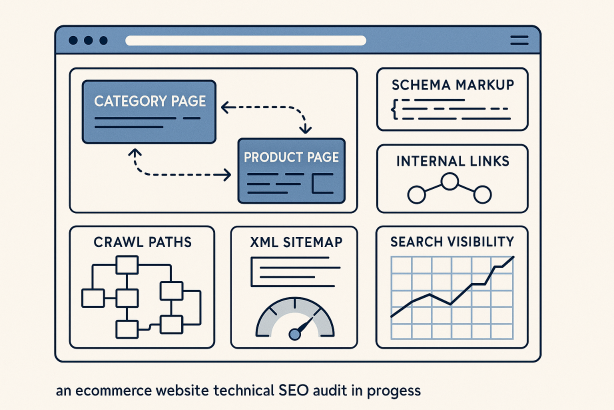
Site architecture for ecommerce affects crawl depth, internal link equity, and how clearly your catalog is organized. A messy structure makes discovery harder for both users and search engines.
Start with a logical hierarchy:
- Homepage
- Main categories
- Subcategories where useful
- Product pages
Keep important revenue-driving pages close to the homepage. In most stores, high-priority categories should be reachable in a few clicks, and products should sit inside clear thematic pathways.
Use descriptive, stable URL paths. A structure like /mens/shoes/running/ is easier to understand than a cluttered parameter-heavy URL. Avoid creating multiple URL versions for the same page through tracking parameters, inconsistent trailing slashes, uppercase variants, or internal search paths.
Strong architecture also improves internal linking for ecommerce. When categories, subcategories, and products reinforce each other, search engines can better understand topical relationships across the catalog.
Step 3: Fix Duplicate Content Across Product, Variant, and Filter URLs
Duplicate content is one of the most common ecommerce technical SEO issues. It often appears when the same product is accessible through several categories, when color or size variants create separate URLs, or when filtered pages generate endless combinations.
Start by identifying where duplication is useful for users but harmful for indexing. Then decide which URL should be the primary version.
- Products in multiple categories: choose one canonical product URL and use it consistently in internal linking.
- Variant pages: if variants do not deserve separate search visibility, consolidate them under a primary product page.
- Sorting and filtering parameters: prevent low-value combinations from competing with canonical categories.
- Session and tracking parameters: normalize them so they do not create duplicate indexable pages.
Canonical tags help consolidate signals, but they are not a substitute for clean architecture. The best setup is to reduce unnecessary duplicate URLs at the source, then use canonicalization to reinforce the preferred version.
A practical indexation framework
| URL type | Usually index? | Technical SEO guidance |
|---|---|---|
| Main category pages | Yes | Make self-canonical, include in sitemap, strengthen internal links |
| High-value subcategory pages | Yes | Target clear search intent and avoid thin copy |
| Primary product pages | Yes | Use one preferred URL per product |
| Filter combinations | Sometimes | Index only if they match real search demand and are unique enough |
| Sort, session, and tracking URLs | No | Keep out of indexable pathways and consolidate signals |
| Internal search results | No | Do not treat them as landing pages for organic search |
Step 4: Optimize Category Pages for Search Intent and Technical Strength
Category page SEO often drives more non-branded traffic than individual products because category pages align well with broad commercial searches. They also tend to stay live longer than product pages, making them more stable ranking assets.
For each key category page:
- Write a unique title tag and meta description aligned with the core query.
- Use one clear H1 that matches the category topic.
- Add concise supporting copy that explains the product range without overwhelming the page.
- Surface subcategories and featured products through crawlable HTML links.
- Keep pagination and sorting usable without creating index bloat.
A strong category page is not just a product grid. It should function as a search landing page with a clear theme, helpful internal links, and enough text to establish relevance while still keeping the shopping experience front and center.
Step 5: Improve Product Page SEO Without Weakening the User Experience
Product page SEO succeeds when technical clarity and commercial clarity work together. Search engines need enough unique information to understand the page, and shoppers need enough trust signals to convert.
Make sure product pages include:
- Unique product descriptions rather than copied manufacturer text where possible
- Clear product naming that matches how people search
- Descriptive image filenames and alt text where relevant
- Structured data for product details
- Availability, pricing, and variant information presented consistently
- Related product links to support discovery and crawl paths
Avoid thin product pages with only a name, price, and image. That makes it harder to rank and easier to create duplication across similar items. If products are discontinued, do not blindly delete them. Decide whether to redirect to a close equivalent, keep the page live if demand still exists, or return the correct status when the item should truly disappear.
Step 6: Control Faceted Navigation SEO and Crawl Budget
Faceted navigation SEO is where many stores lose control. Filters for size, color, brand, price, material, and availability can create massive numbers of URLs. That is bad for crawl budget ecommerce efficiency if search engines spend time on pages that will never rank or convert from search.
The right approach is selective indexation. Not every filter page should be indexed. Index only faceted URLs that meet three tests:
- They match a real search pattern
- They offer unique enough products or intent
- They can be supported with clean internal linking and self-referencing canonicals
For the rest, reduce crawl waste by limiting indexable pathways, keeping internal linking focused on priority URLs, and avoiding endless parameter combinations. Be especially careful with filters that stack into very narrow result sets. Those pages often add complexity without adding search value.
Step 7: Add Schema Markup That Supports Ecommerce Search Visibility
Schema markup ecommerce implementation helps search engines interpret your pages more precisely. It does not guarantee enhanced results, but it improves clarity and eligibility where your markup is valid and the page content supports it.
Useful structured data types for ecommerce include:
- Product for product details
- BreadcrumbList for navigational hierarchy
- Organization or website-level markup where appropriate
- Review or aggregate rating markup only when it accurately reflects visible content
Keep markup aligned with on-page reality. If availability, price, or review content changes, structured data should update too. Inaccurate schema is worse than incomplete schema because it creates conflicting signals.
Step 8: Strengthen Internal Linking Across Categories and Products
Internal linking is one of the most underused levers in SEO for ecommerce. It distributes authority, clarifies hierarchy, and helps search engines find deeper pages faster.
Look for opportunities to add useful, crawlable links through:
- Breadcrumbs
- Related categories
- Top-selling or featured product modules
- Complementary product recommendations
- Editorial buying guides linked to commercial pages
Keep anchor text descriptive but natural. Do not force exact-match anchors everywhere. The goal is to create meaningful pathways that reflect how users browse and how your catalog is organized.
Step 9: Improve Core Web Vitals and Template Performance
Technical SEO for ecommerce is not complete without speed and usability. Large image files, heavy scripts, third-party widgets, and bloated app integrations can slow category and product templates dramatically.
Prioritize improvements that affect the whole site, not just individual URLs:
- Compress and properly size images
- Use modern image formats when supported
- Reduce render-blocking assets
- Limit unnecessary third-party scripts
- Streamline theme code and template logic
- Improve mobile layout stability and tap usability
Category pages deserve special attention because they often load many products at once. A slow collection template can limit crawl efficiency and degrade user engagement at the same time.
Step 10: Monitor Technical SEO Changes Continuously
Stores change constantly. Products go out of stock, categories expand, navigation gets redesigned, apps are added, and templates are updated. That means SEO for ecommerce is not a one-time project.
Create a repeatable monitoring routine for:
- Index coverage changes
- Broken internal links
- Redirect chains
- Canonical errors
- Structured data issues
- Orphaned pages
- Sudden noindex or robots problems
Technical SEO wins come from consistency. The stores that maintain search visibility are usually the ones that catch problems early, before they spread across thousands of URLs.
Make SEO for Ecommerce Easier to Maintain
Once your store is technically sound, the next challenge is operational discipline. Audits, fixes, and checks need to happen regularly as your catalog and templates evolve.
If you want a simpler way to turn this process into an ongoing workflow, explore Rabbit SEO. It can help your team stay organized around technical SEO priorities, keep improvements moving, and maintain a stronger foundation for organic growth.
Final Thoughts on SEO for Ecommerce
The best SEO for ecommerce strategy starts with technical clarity: crawlable pages, clean architecture, controlled duplication, focused indexation, strong internal linking, accurate schema, and fast templates. When those pieces work together, your most valuable categories and products have a much better chance to rank.
Follow these steps in order, document your decisions, and review them as the site evolves. That is how technical SEO becomes a scalable growth channel for ecommerce rather than a constant cleanup job.