
If you want to learn how to optimize web pages for SEO, the first step is not adding more tactics. It is removing the mistakes that hold pages back. Many pages fail to perform not because the topic is weak, but because the fundamentals are misaligned: the page targets the wrong intent, sends mixed indexing signals, loads too slowly, or gives search engines a poor content structure to interpret.
That is why strong on-page SEO and strong technical execution have to work together. A beautifully written page can still underperform if it is hard to crawl, poorly linked, or accidentally canonicalized away. On the other side, a technically clean page will still struggle if the content does not satisfy the query behind the search.
In this guide, we will break down the most common mistakes to avoid, explain why they matter, and show what to do instead. If your goal is to understand how to optimize web pages for SEO in a way that improves visibility and supports conversions, this is where to focus.
How to Optimize Web Pages for SEO Starts With the Right Priorities
Page optimization is often treated like a checklist of isolated tasks: add a keyword, shorten the title, compress images, and move on. In reality, high-performing pages are built around four connected priorities:
- Relevance: the page matches search intent.
- Clarity: the content structure helps users and search engines understand the topic.
- Accessibility: the page supports healthy crawlability and indexability.
- Usability: the page loads quickly, works well on mobile, and guides the next action.
Most optimization mistakes happen when one of those priorities is ignored. Before diving into the details, here is a quick summary of the errors that most often undermine otherwise good pages.
| Mistake | Why It Hurts | Better Direction |
|---|---|---|
| Targeting the wrong intent | Rankings fail to stick and engagement is weak | Map the page to the actual query purpose |
| Weak titles and meta descriptions | Lower relevance and fewer clicks | Write specific, useful SERP copy |
| Messy heading structure | Poor topical clarity | Use a logical hierarchy from H1 to H3 |
| Thin or duplicate content | Low distinct value | Create unique, complete page coverage |
| Bad indexation signals | Important pages are ignored or consolidated incorrectly | Review noindex, robots, and canonical tags |
| Slow page performance | Weak user experience and inefficient rendering | Improve assets, layout stability, and delivery |
| Poor internal linking | Pages become hard to discover and prioritize | Strengthen internal linking paths |
| Unoptimized media | Slower loads and weak image context | Compress files and add descriptive alt text |
| Missing structured context | Reduced search result clarity | Use relevant schema where appropriate |
| No ongoing QA | Problems return unnoticed | Build reviews into your workflow |
10 Mistakes to Avoid When Learning How to Optimize Web Pages for SEO
1. Optimizing for keywords instead of search intent
The most common mistake is treating optimization as keyword placement rather than problem solving. A page can mention a phrase in all the expected locations and still miss the mark if it does not match what the searcher wants.
Start by asking what the query is really asking for. Is the user comparing options, trying to complete a task, looking for a definition, or ready to buy? If your page format does not align with that purpose, everything else becomes less effective. This is especially important for competitive pages where search engines already understand the dominant intent pattern.
Good optimization means matching the page type, depth, and angle to the query. In practice, that may mean turning a broad article into a step-by-step guide, expanding a thin service page with decision-making details, or separating one mixed page into clearer topic-specific pages.
2. Writing weak title tags and meta descriptions
Your title tag remains one of the clearest signals of topical focus. Yet many pages waste it with vague wording, duplicated templates, or keyword stuffing. The result is lower clarity for search engines and less appeal in the search results.
A strong title tag should state the topic plainly, include the primary phrase naturally, and communicate a reason to click. Meta descriptions do not directly control rankings, but they still matter for click-through behavior because they frame the value of the page.
Avoid titles that are too generic, too long, or too similar across multiple pages. If every page in a section sounds nearly identical, you create unnecessary ambiguity. Each important URL should have a distinct purpose reflected in its title and description.
3. Using a confusing heading structure
Headings do more than break up text visually. They help define the topic hierarchy of the page. When headings are skipped, duplicated awkwardly, or used only for styling, the page becomes harder to interpret.
Each page should usually have one clear H1 that reflects the primary topic. H2s should divide major sections, and H3s should organize subpoints within those sections. That structure helps both users scan the page and search engines understand how the content is grouped.
This does not mean forcing keywords into every heading. It means creating a logical outline. If a page feels disorganized when viewed only by its headings, it likely needs restructuring.
4. Publishing thin, duplicated, or stale content
One of the easiest ways to weaken a page is to publish content that offers little unique value. Thin pages, lightly reworded duplicates, and outdated articles send a poor quality signal even when the technical setup is fine.
For commercial pages, thin content often shows up as short service descriptions with no explanation of fit, process, scope, or next steps. For informational pages, it appears as surface-level writing that answers the topic too briefly or repeats what users can find everywhere else.
Optimization should improve usefulness, not just density. Expand pages where depth is missing, consolidate overlapping content, and refresh stale sections that no longer reflect current products, processes, or terminology. If two pages target the same topic from nearly the same angle, review them for overlap before they compete with each other.
5. Ignoring crawlability, indexability, and canonical signals
This is where technical SEO becomes decisive. You may know exactly how to optimize web pages for SEO from a content perspective, but the page still will not perform if search engines cannot crawl it reliably or are being told not to index it.
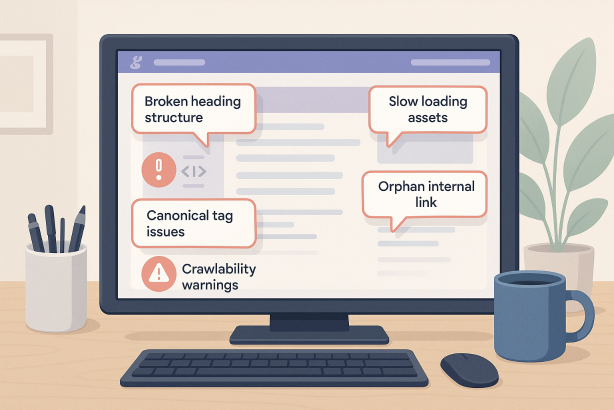
Common issues include accidental noindex tags, blocked resources, broken internal discovery paths, and misused canonical tags. Canonicals are especially risky when applied carelessly, because they can tell search engines to treat another URL as the preferred version even when the current page should stand on its own.
During a technical SEO audit, review whether the page is indexable, self-canonical where appropriate, linked from relevant sections, and free from contradictory signals. Also verify that parameter versions, faceted URLs, or alternate variants are not creating unnecessary duplication or confusion.
6. Treating page speed optimization as optional
Fast pages are easier to use, easier to render, and generally easier to maintain. Slow pages create friction at every stage, from loading assets to interacting with the content. While performance is not the only factor behind rankings, it affects how effectively a page serves the user.
Page speed optimization usually starts with practical fixes: compress oversized images, reduce unnecessary scripts, defer noncritical resources, and simplify bloated templates. Mobile performance deserves special attention because design decisions that feel acceptable on desktop can become disruptive on smaller devices and weaker connections.
Technical SEO is not just about whether a page exists. It is about whether that page can be accessed, rendered, and used without friction. If performance problems are severe, they can undermine otherwise strong content.
7. Neglecting internal linking and leaving pages orphaned
Many teams publish good pages and then fail to give them a strong place within the site architecture. Without clear internal linking, pages receive less contextual relevance, weaker discovery signals, and fewer pathways for users to continue their journey.
Important pages should be linked from other relevant pages using natural, descriptive anchor text. They should also sit inside a logical hierarchy, not depend on one buried pathway or a temporary promotional link. Orphan pages are especially problematic because they may exist in the XML sitemap but remain difficult for users and crawlers to find through normal navigation.
Internal links are not just a distribution mechanism. They are part of how search engines understand topic relationships. Strong linking patterns reinforce your site structure and help prioritize the pages that matter most.
8. Overlooking image optimization and media efficiency
Images often create two avoidable problems at once: they slow the page down and fail to contribute useful context. Large, uncompressed files hurt performance, while generic filenames and empty alt text miss an opportunity to improve accessibility and descriptive clarity.
Optimize media by choosing appropriate dimensions, compressing files, and loading the right format for the use case. Alt text should describe the image when it adds meaning, not stuff keywords unnaturally. Product, category, and instructional pages especially benefit from media that is purposeful rather than decorative.
For SEO, image work is rarely the main driver of success, but it often removes unnecessary drag. On high-value pages, those details add up.
9. Skipping structured data where it adds clear meaning
Structured data does not compensate for weak content, but it can help search engines interpret page elements more clearly. The mistake is not that every page lacks schema; it is that relevant pages are published without the markup that supports their content type.
Depending on the page, that may include article, product, FAQ, breadcrumb, or organization markup. The goal is not to chase every possible enhancement. The goal is to add accurate, relevant structure that matches what is visibly present on the page.
Keep the implementation clean and truthful. Marking up content that users cannot actually see, or using a schema type that does not match the page, creates more risk than value.
10. Publishing once and never reviewing again
Even well-optimized pages decline if they are never reviewed. Templates change, scripts accumulate, links break, competitors improve, and search behavior evolves. Optimization is not a one-time task; it is ongoing quality control.
Build recurring checks into your workflow. Review indexing status, core page elements, internal links, content freshness, and engagement signals. If a page drops in visibility, do not assume the problem is only external. Recheck the basics first: intent match, technical health, page structure, and differentiation from related URLs.
The best page optimization processes are repeatable. They make quality easier to maintain across the full site, not just on a few showcase pages.
A Practical Checklist for How to Optimize Web Pages for SEO
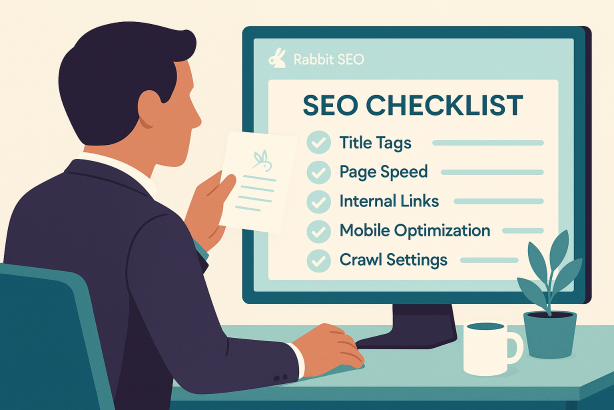
Once you know the mistakes, the work becomes much clearer. Use this streamlined review before publishing or refreshing any important page:
- Confirm the page matches the dominant search intent for its target query.
- Write a unique title tag that includes the primary topic naturally.
- Create a meta description that accurately previews the page value.
- Use one clear H1 and a logical H2 to H3 structure.
- Make sure the content is complete, specific, and meaningfully different from similar pages.
- Check crawlability and indexability, including noindex, robots, and canonical setup.
- Review URLs for cleanliness and consistency.
- Improve page speed optimization basics such as image compression and script discipline.
- Add relevant internal linking from related pages and key navigation pathways.
- Optimize images with appropriate sizes, filenames, and alt text where useful.
- Apply structured data only when it matches visible page content.
- Revisit important pages regularly as part of your technical SEO workflow.
This is the practical side of how to optimize web pages for SEO: not chasing every tactic, but systematically removing the blockers that reduce discoverability, relevance, and usability.
Make Page Optimization Easier With Rabbit SEO
Knowing what to fix is one challenge. Keeping dozens or hundreds of pages healthy over time is another. Rabbit SEO helps teams stay on top of the issues that quietly erode performance, from technical signals and page structure to internal link gaps and ongoing optimization opportunities.
If you want a more efficient way to review important URLs, prioritize fixes, and maintain consistent SEO standards across your site, Rabbit SEO can help turn scattered audits into a repeatable workflow.
Final Thoughts on How to Optimize Web Pages for SEO
The best answer to how to optimize web pages for SEO is usually not more complexity. It is better discipline. Avoid the mistakes that confuse search engines, frustrate users, or dilute page relevance, and many rankings problems become far easier to solve.
Focus on intent, structure, technical clarity, and usability. Make sure your pages can be crawled, indexed, understood, and acted on. Then keep reviewing them as your site grows. That is how strong technical SEO supports stronger page performance over the long term.