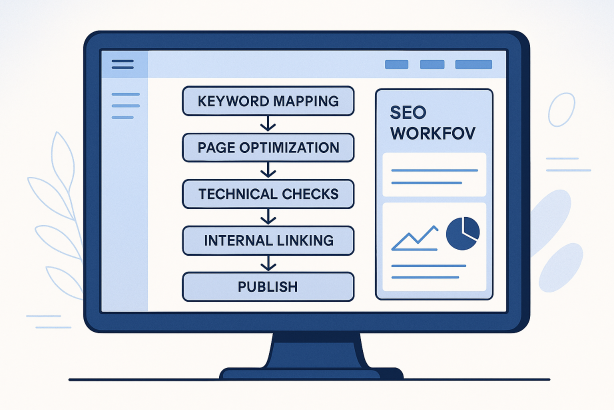

Wix Website SEO works best when you treat it as a repeatable workflow rather than a one-time setup. That is where many site owners go wrong. They add a homepage title tag, publish a few pages, maybe write one blog post, and expect search visibility to grow on its own.
In reality, sustainable SEO for Wix sites depends on a simple sequence: choose the right keywords, map them to the right pages, build clear structure, optimize page elements, publish useful content, strengthen internal links, and review performance on a schedule. When that workflow is in place, your site becomes easier to crawl, easier to understand, and more useful for real visitors.
This tutorial walks through a practical Wix Website SEO process you can reuse whether you run a local business site, service website, portfolio, or small ecommerce brand. The goal is not to overload you with theory. The goal is to give you an operational system you can follow every month.
Why a workflow matters for Wix Website SEO
Wix has improved significantly as a platform for search optimization. You can edit title tags, meta descriptions, URLs, structured page settings, image alt text, redirects, and more. But the platform features alone do not create rankings. The real advantage comes from using those features in the right order.
A strong workflow helps you:
- Prioritize high-impact tasks instead of editing random pages.
- Avoid keyword overlap by assigning one main search intent to each important page.
- Keep technical issues contained as the site grows.
- Publish content consistently without weakening your core service or product pages.
- Measure progress clearly and know what to improve next.
If you only remember one thing from this guide, make it this: good Wix SEO is not a single checklist item. It is a publishing and optimization rhythm.
The core Wix SEO workflow at a glance
| Phase | Main Goal | Key Actions |
|---|---|---|
| 1. Planning | Match business goals to search intent | Keyword research, page mapping, priority list |
| 2. Site Structure | Create a crawlable, logical architecture | Navigation cleanup, URLs, page hierarchy |
| 3. On-Page Optimization | Improve relevance and click potential | Titles, headings, copy, media, metadata |
| 4. Technical Setup | Reduce crawl and indexing friction | Indexing settings, redirects, mobile review, image handling |
| 5. Publishing | Expand topical coverage | Blog calendar, supporting content, refreshes |
| 6. Internal Linking | Strengthen important pages | Contextual links, hub pages, related content paths |
| 7. Measurement | Improve based on evidence | Rank tracking, traffic review, page updates |
Step 1: Start with keyword research and page mapping
The best Wix Website SEO workflow starts before you edit anything inside the builder. First decide which pages should rank for which searches.
Choose one primary intent per core page
Your homepage, service pages, category pages, and major landing pages should each target a distinct search intent. That prevents internal competition and keeps your messaging focused.
For example, a photographer in Bristol might separate intent like this:
- Homepage: brand and broad business positioning
- Wedding photography page: commercial service intent
- Family photography page: separate service intent
- Pricing page: bottom-funnel decision support
- Blog posts: informational supporting topics
Build a practical keyword map
Use a spreadsheet and create columns for:
- Page URL
- Primary keyword
- Secondary keyword variations
- Search intent
- Current title tag
- Priority level
- Next action
This simple map becomes the control center for your Wix SEO checklist. It keeps future updates organized and stops you from publishing articles that should really be service pages.
Know when to create a new page
Do not force every keyword onto the homepage. If a topic has its own clear commercial or informational intent, give it its own URL. That usually creates stronger relevance, clearer navigation, and better internal linking options.
Step 2: Clean up your site structure before deeper optimization
Site structure has a direct effect on SEO for Wix sites. A strong structure helps search engines understand what matters most and helps visitors move naturally from discovery to conversion.
Keep navigation simple and intentional
Your main navigation should highlight the pages that matter most to the business. Avoid stuffing every minor page into the top menu. In most cases, a clean navigation includes:
- Home
- Main services or product categories
- About
- Blog or resources
- Contact
If you have many services, use parent-child groupings where they improve clarity. The goal is not complexity. The goal is discoverability.
Use short, descriptive URLs
In Wix, make page slugs clean and readable. Good URLs are usually:
- Short
- Relevant to the page topic
- Free from unnecessary parameters or filler words
Avoid changing established URLs unless necessary. If you do update one, add a proper redirect so users and search engines land on the right destination.
Align page hierarchy with business value
Your most important pages should be easy to reach within a few clicks. If key sales pages are buried under weak navigation or only accessible through old blog posts, they will be harder to prioritize in your internal linking strategy.
Step 3: Optimize every important page inside Wix
This is where Wix on-page SEO delivers quick wins. Once your keyword map is ready, optimize your high-priority pages first.
Write stronger title tags
Each important page needs a unique title tag built around the main topic and user intent. Strong titles are specific, readable, and written for clicks as well as relevance.
Good patterns often include:
- Primary topic first
- Location or qualifier where useful
- Brand name at the end when it fits
Do not repeat the same title structure across every page with only one word changed. That usually produces thin differentiation.
Use one clear H1 and logical headings
Your H1 should reflect the core topic of the page. Subheadings should break the page into useful sections that answer real questions or support conversion. Headings are not just formatting elements. They help organize relevance and readability.
Strengthen the body copy
Thin pages rarely perform well for competitive queries. Add content that genuinely helps the visitor decide, compare, understand, or act. Depending on the page, that may include:
- Service scope
- Who the offer is for
- Process details
- Location coverage
- Frequently asked questions
- Trust-building details such as policies, experience, or deliverables
Use the primary keyword naturally in the introduction, one or two subheadings where relevant, and the conclusion or call to action. Avoid awkward repetition.
Optimize images and media
For strong Wix Website SEO, every major page should review image basics:
- Use descriptive file names before upload where practical
- Add accurate alt text when the image supports page meaning
- Compress overly large assets
- Avoid decorative media that slows the page without adding value
Improve meta descriptions for click-through
Meta descriptions do not guarantee rankings, but they can influence whether a searcher clicks. Write them like concise ad copy: clear topic, clear value, clear reason to visit.
Step 4: Run a Wix technical SEO check on a schedule
Wix technical SEO does not have to be intimidating. For most sites, the highest-value checks are straightforward and repeatable.
Confirm indexing rules
Review which pages should be indexed and which should not. Pages with little standalone search value, duplicate variants, or utility-only functions may not belong in search results. Important pages, on the other hand, should not be accidentally blocked.
Review redirects after edits
Whenever you merge pages, rename URLs, or remove old content, check redirects. This is especially important on sites that evolve over time, because broken paths can waste link equity and damage user experience.
Check mobile presentation
Many Wix sites look fine on desktop but become harder to use on smaller screens. Review:
- Heading spacing
- Button visibility
- Image scaling
- Tap targets
- Load-heavy sections above the fold
Mobile usability is not separate from SEO. If users struggle to navigate key pages, rankings alone will not drive results.
Watch for duplicate or overlapping pages
Over time, sites often collect similar service pages, outdated location pages, or blog posts that target the same query from slightly different angles. Consolidate where needed and strengthen the best version.
Keep templates consistent
Consistency matters on larger Wix websites. Important pages should follow a usable template for titles, headings, internal links, FAQs, and conversion elements. That makes scaling easier and reduces missed SEO fields.
Step 5: Build a content publishing workflow that supports core pages
Many brands misunderstand content marketing on Wix. They publish broad articles that never support the pages they actually want to rank. A better approach is to let content strengthen your commercial architecture.
Create supporting topics around priority pages
If you want a service page to rank, publish supporting articles that answer adjacent questions. For example:
- How to choose a provider
- What the process looks like
- Common mistakes to avoid
- Location-specific considerations
- Pricing factors
This helps expand topical coverage while creating natural internal link opportunities back to your main service or category page.
Use a simple editorial cadence
Your publishing schedule does not need to be aggressive. It needs to be sustainable. A practical rhythm might include:
- One new high-quality supporting article each week or every two weeks
- One refresh of an older page or post each month
- One internal linking review each month
That cadence is realistic for most small teams and works well for keyword research for Wix-driven publishing.
Refresh instead of endlessly expanding
Not every new keyword needs a new post. Sometimes the better move is to improve an existing article, add missing sections, update internal links, or sharpen the page for a clearer intent match.
Step 6: Use internal links to distribute relevance and authority
A strong internal linking strategy is one of the most underused advantages on Wix sites. Internal links help search engines understand page relationships and help users move toward higher-intent pages.
Link from supporting content to conversion pages
Every useful article should have a reason to exist within the wider site. That usually means linking naturally to a relevant service, product, category, or contact page.
Use descriptive anchor text
Avoid vague anchors like “click here” when a more descriptive phrase would be clearer. Good anchor text tells both users and search engines what they can expect on the next page.
Build topic clusters where appropriate
If your site covers a subject in depth, create a main hub page and support it with related subtopics. Then connect those pages in both directions where it helps the user. This is particularly effective for service education, resource sections, and local landing page ecosystems.
Step 7: Add local intent if your Wix business serves a defined area
For many businesses, local SEO for Wix is where the clearest opportunities live. If you serve a city, region, or set of specific service areas, reflect that intentionally in your site structure and content.
- Create dedicated location-relevant service pages when the intent justifies them
- Include service area details naturally in core page copy
- Keep your contact details consistent across the site
- Use locally meaningful proof points, FAQs, and context where appropriate
The key is authenticity. Do not mass-produce thin location pages with only the town name swapped out. Build pages that answer location-specific questions and support real commercial intent.
Step 8: Measure, review, and improve every month
The final step in a strong Wix Website SEO workflow is review. Without measurement, you cannot tell whether a page needs better targeting, better copy, stronger links, or a full repositioning.
Track page-level performance
Review your important pages one by one. Look for:
- Which pages are gaining visibility
- Which pages are stuck despite optimization
- Which blog posts attract traffic but fail to pass users onward
- Which pages may be competing with each other
Prioritize by business value, not vanity
Traffic alone is not the goal. A page that brings qualified leads or sales is usually more valuable than a post that attracts broad informational visits with no clear next step.
Create a monthly action list
Turn review into action with a short monthly sprint list:
- Refresh two underperforming core pages
- Publish one supporting article
- Add internal links from recent posts
- Fix broken links or redirect issues
- Review title tags on pages with weak click potential
Consistency beats bursts of one-off effort.
Common Wix SEO mistakes that break the workflow
- Targeting the same keyword on multiple pages, which creates confusion and page cannibalization.
- Publishing blog content without linking it to core offers, which limits business impact.
- Leaving thin service pages unchanged for months, even when they never gain traction.
- Changing URLs casually without redirects.
- Overloading navigation with too many equal-priority links.
- Ignoring mobile layout issues because the desktop version looks polished.
- Writing metadata once and never revisiting it, even when page intent evolves.
A simple 30-60-90 day Wix Website SEO plan
First 30 days
- Audit core pages
- Create your keyword map
- Fix page titles, H1s, and URLs where needed
- Improve navigation and page hierarchy
- Check indexing settings and redirects
Days 31 to 60
- Expand copy on priority service or category pages
- Publish supporting content around main offers
- Add stronger internal links sitewide
- Improve image handling and metadata
Days 61 to 90
- Review which pages are improving
- Consolidate overlapping content if necessary
- Refresh underperforming articles
- Refine local intent pages if relevant
- Build the next content sprint from real performance signals
Make your Wix Website SEO workflow easier to manage
If you want a cleaner way to organize optimization tasks, monitor page opportunities, and keep your workflow moving, Rabbit SEO can help. Use it to stay focused on the pages that matter, spot gaps faster, and turn scattered SEO work into a repeatable system your team can actually maintain.
Whether you are optimizing a service website, local business presence, or growing content hub, the biggest upgrade usually is not a secret tactic. It is better execution.
Final thoughts on Wix Website SEO
Wix Website SEO is most effective when you stop thinking in isolated tasks and start thinking in workflows. Plan the keyword map, structure the site clearly, optimize the right pages, support them with content, strengthen internal links, and review performance on a schedule.
That process is what turns a Wix site from a digital brochure into a searchable, scalable acquisition channel. If you build the workflow once and follow it consistently, your SEO becomes easier to manage and far more likely to improve over time.