
If you want better rankings, stronger traffic quality, and pages that convert, you need more than a list of scattered SEO tips. You need a repeatable system. That is exactly what this guide delivers: a practical owner’s framework for how to optimize web pages for SEO without losing sight of technical quality, user experience, and commercial intent.
Many site owners focus on publishing more pages when the bigger opportunity is improving the pages they already have. In technical SEO, small page-level issues add up quickly: weak title tags, poor heading structure, thin internal linking, slow load times, indexing confusion, and pages that miss the user’s intent. Fix those problems consistently, and your site becomes easier for search engines to crawl, understand, and trust.
Use this checklist whether you are reviewing service pages, landing pages, product pages, or blog content. It is written for owners who want clear decisions, not vague advice.
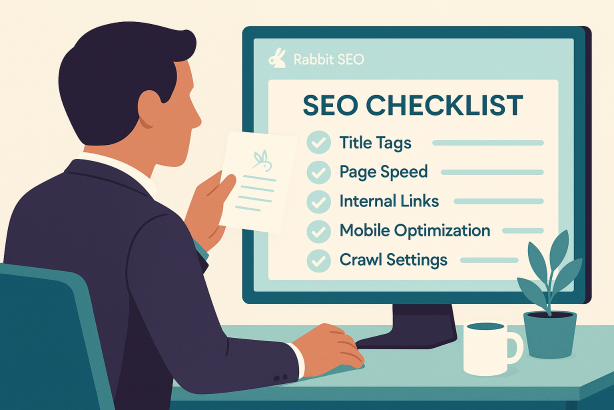
How to optimize web pages for SEO: the owner’s quick checklist
| Area | What to check | Why it matters |
|---|---|---|
| Search intent | Match the page to what the searcher actually wants | Improves relevance and reduces bounce from mismatched expectations |
| Primary keyword placement | Use the main keyword in the title, H1, intro, and conclusion | Helps clarify the page topic |
| SEO-friendly URLs | Keep URLs short, descriptive, and stable | Supports crawling and page clarity |
| Title tag optimization | Write a compelling, specific page title | Improves topical relevance and click potential |
| Content structure | Use logical headings, scannable sections, and complete answers | Improves readability and search coverage |
| Internal linking strategy | Link to and from related pages with useful anchor text | Strengthens discovery and topic relationships |
| Indexability | Check canonicals, robots rules, and noindex settings | Prevents important pages from being excluded or diluted |
| Site speed optimization | Reduce unnecessary weight and improve load performance | Supports user experience and crawl efficiency |
| Mobile usability | Review layout, tap targets, readability, and forms | Ensures pages perform well on the devices people actually use |
| Conversion path | Make the next step obvious | Turns rankings into leads, sales, or inquiries |
1. Start with search intent before changing anything else
The first step in how to optimize web pages for SEO is not technical at all. It is strategic. Before editing a page, confirm what kind of result a user expects when they search your target phrase. If your page does not align with intent, technical improvements alone will not solve the problem.
Ask these questions:
- Is the searcher trying to learn, compare, buy, or contact?
- Should this page be informational, commercial, transactional, or local?
- Does the current page type match what is already ranking?
- Is the page too broad or too narrow for the topic?
For example, if a keyword suggests comparison or evaluation, a short sales page may underperform because it does not answer enough questions. If a search is clearly transactional, a long educational article may attract attention without converting. Search intent optimization keeps your page aligned with what search engines are trying to serve.
Owners should think in terms of page purpose. Every page should have one primary job. If a page is trying to rank for several unrelated intents at once, it usually becomes weaker for all of them.
2. Build the page around one primary keyword and a clear topic cluster
Once intent is clear, define the page’s main keyword and supporting terms. Your goal is not to force exact-match usage into every paragraph. Your goal is to make the topic unmistakable.
For page-level SEO, confirm that the primary keyword appears naturally in these places:
- The title tag
- The H1
- The introduction
- At least one subheading where appropriate
- The conclusion
Then support that phrase with semantically related language. This is where a strong on-page SEO checklist becomes valuable. You are not just optimizing for a single string of words. You are building a page that covers the subject with enough clarity and depth for both users and search engines.
Avoid these common mistakes:
- Targeting the same primary keyword across multiple pages
- Stuffing the exact phrase into every heading
- Writing copy that sounds unnatural just to include keywords
- Ignoring related questions that help complete the topic
Good optimization feels obvious, not forced. A well-structured page should read like it was written for a human first and organized for search second.
3. Fix the page title, meta description, and URL
Title tag optimization remains one of the highest-value page improvements because it directly affects topical clarity and click appeal. Your page title should tell searchers exactly what they will get while reflecting the page’s real content.
Title tag checklist
- Include the primary keyword naturally near the beginning when possible
- Make the title specific rather than generic
- Reflect the actual angle of the page
- Avoid duplication across the site
Your meta description does not usually determine rankings directly, but it strongly influences whether a user chooses your result. Write it as a concise value proposition. Summarize the page clearly and make the benefit of clicking obvious.
SEO-friendly URL checklist
- Keep the URL short and readable
- Use real words, not random parameters where possible
- Include the main topic naturally
- Avoid changing URLs unless necessary
Stable, descriptive URLs are easier to understand, easier to share, and better for long-term page management. If you do change a URL, implement the correct redirect so you do not lose existing authority or create crawl waste.
4. Improve heading structure and content depth
One of the simplest ways to improve a page is to make it easier to scan. Clear heading structure helps visitors find answers quickly and helps search engines interpret the relationship between sections.
Your page should usually have:
- One clear H1 for the main topic
- H2s for major sections
- H3s where subtopics need further organization
Do not use headings as decoration. Each heading should signal a real topic shift or new layer of explanation. If a page feels repetitive, the issue is often structural. It may repeat similar points because the topic hierarchy was never defined.
Content depth matters too, but depth is not the same as length. A page should cover the essential questions a user would reasonably ask before moving forward. For a commercial page, that may include pricing approach, process, use cases, limitations, and next steps. For an educational page, it may include definitions, examples, workflows, and common mistakes.
When owners review content, they should ask: does this page fully earn its right to rank? If not, the answer is usually better coverage, better structure, or both.
5. Strengthen internal linking and page relationships
A smart internal linking strategy is one of the most overlooked parts of technical SEO. Internal links help search engines discover pages, understand site architecture, and evaluate topical relationships. They also help users continue their journey instead of reaching a dead end.
Every important page should have:
- Links from relevant higher-authority pages on your site
- Links to supporting or next-step pages
- Anchor text that describes the destination naturally
Common problems include orphan pages, vague anchors like “click here,” and internal links that point to pages with weak intent alignment. Links should feel editorially justified. If you mention a concept, service, or related guide, that is often a natural linking opportunity.
Owners should also look for content clusters. If you have several pages around one subject, connect them intentionally. This improves navigation and creates stronger topical signals across the site.
6. Check indexability, canonicals, and crawl control
This is where technical SEO starts to separate a polished site from an unreliable one. A page cannot perform well in organic search if search engines cannot crawl it properly, index it correctly, or identify it as the preferred version.
During a technical SEO audit, verify the following:
- The page is not accidentally blocked by robots rules
- The page is not marked noindex unless that is intentional
- The canonical tag points to the correct version
- Only one preferred version of the page is being indexed
- Redirects are clean and relevant
Canonical mistakes are especially common on sites with filters, parameters, duplicate product paths, or reused content blocks. When search engines see multiple similar versions of a page, they may split signals or index the wrong version. That weakens the page you actually want to rank.
At the owner level, you do not need to inspect every technical detail yourself. But you do need to know whether your key pages are indexable, canonicalized correctly, and free from avoidable crawl confusion.
7. Make the page fast, stable, and mobile-friendly
Site speed optimization is not just a developer concern. Slow pages reduce usability, increase abandonment, and create friction before a visitor even engages with your message.
Focus on practical page-level improvements:
- Compress oversized images
- Use modern image formats when appropriate
- Remove unnecessary scripts from key pages
- Limit heavy visual elements that do not add value
- Reduce clutter above the fold
Mobile experience matters just as much. Review the page on a phone, not only on a desktop monitor. Is the main headline visible quickly? Are buttons easy to tap? Is text readable without zooming? Are forms short and usable?
Technical SEO and UX overlap here. A page that loads efficiently and works cleanly across devices sends a stronger quality signal than a page that feels fragile or slow.
8. Optimize images, media, and supporting assets
Images should help a page, not weigh it down. Every media asset should have a purpose: explain, demonstrate, reassure, or persuade. If it does none of those, it may simply be adding page weight.
Image optimization basics include:
- Descriptive file names
- Helpful alt text where appropriate
- Reasonable dimensions for the layout
- Compression before upload
Also review embedded videos, third-party widgets, sliders, and decorative graphics. These can affect performance, layout stability, and focus. A leaner page is often a stronger page.
For service and product pages, supporting assets should reduce uncertainty. Screenshots, diagrams, process visuals, comparison tables, and FAQ sections can all improve page usefulness when used deliberately.
9. Add trust, clarity, and a defined conversion path
Ranking is not the end goal. Owners need pages that turn search visibility into action. That means every page should guide the visitor toward a sensible next step.
Check whether the page answers these conversion questions:
- What is being offered?
- Who is it for?
- Why should the visitor trust this page?
- What should they do next?
Trust can come from clear policies, transparent service descriptions, author expertise, accurate claims, useful FAQs, and friction-free navigation. Clarity matters more than hype. If the page promises too much or leaves important questions unanswered, it weakens both user confidence and business performance.
Calls to action should be specific. “Get started,” “Book a demo,” “Request a quote,” or “Talk to our team” gives more direction than generic prompts. On informational pages, the CTA may point to a deeper guide, a product page, or a consultation.
10. Create an owner review workflow you can repeat
The biggest advantage owners can build is consistency. Instead of treating SEO as a one-time project, turn it into a recurring page review process.
A strong workflow looks like this:
- Select one important page
- Confirm its primary intent and keyword target
- Review title, URL, headings, and on-page copy
- Check internal links in and out
- Verify indexability and canonical setup
- Test page speed and mobile usability
- Improve the CTA and next-step experience
- Republish or refine only when the page is genuinely stronger
This kind of repeatable on-page SEO checklist helps owners prioritize what matters. It also creates better communication between marketing, content, design, and development teams because every page can be reviewed against the same standards.
A practical CTA for owners who want a faster SEO workflow
If you want a simpler way to review, prioritize, and improve important pages, Rabbit SEO can help you turn scattered tasks into a clearer workflow. Instead of guessing which pages need attention first, use a more structured approach to spot optimization opportunities, tighten your technical SEO process, and keep your site moving in the right direction.
If that sounds useful, explore Rabbit SEO and make page optimization part of your regular growth system rather than a one-off fix.
Conclusion: how to optimize web pages for SEO the right way
How to optimize web pages for SEO is not about chasing a trick or adding keywords in random places. It is about making each page easier to understand, easier to crawl, faster to use, and more aligned with what the searcher actually needs.
For owners, the winning approach is simple: start with intent, improve the page structure, strengthen internal links, fix indexability issues, support performance, and make the next action obvious. Do that consistently, and your pages will be in a much better position to earn rankings that actually matter.
The best SEO pages are not just visible. They are technically sound, commercially useful, and worth landing on. That is the standard to aim for every time you publish or update.